
Specto+

SPECTO+ / FOR PHILIPPINE IT TEAMS

Network Security for Philippine IT Teams

Specto+ is a network-defence platform that runs on a virtual machine inside your organisation. It helps Philippine IT teams find devices, review possible weaknesses and spot activity that needs investigation. Discuss your organisation’s network size, virtualisation environment and security priorities with Teqware in Quezon City.
Watch the introduction. Press play to hear the audio.

IN PLAIN ENGLISH

A clearer view for the team responsible for IT.

Answer three practical questions: What is connected to our network? What could someone find from outside? What activity should our IT team investigate?
For IT managers, system administrators and security teams assessing their organisation’s network visibility in the Philippines.

See connected devices

Identify reachable devices and the software they report.

Review external exposure

Check your organisation’s public domains and IP addresses.

Investigate decoy activity

Surface unexpected interaction and review captured evidence.

01 / INTERNAL VISIBILITY

Know what was actually checked.
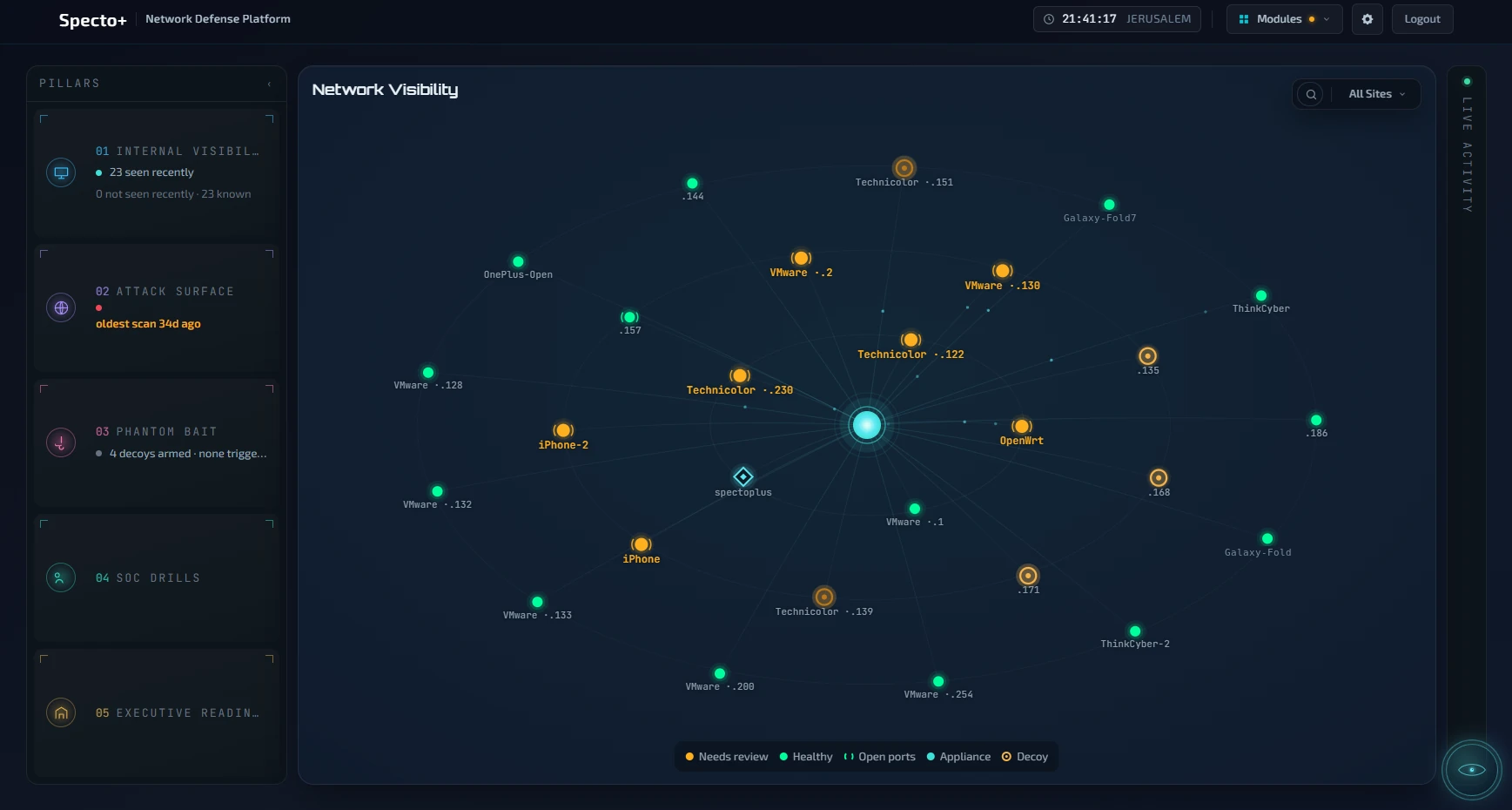
Specto+ scans reachable devices without installing software on each endpoint. It identifies devices and checks reported software versions against published vulnerabilities.
Results distinguish checked devices, findings requiring review and devices it could not assess. Unreachable does not mean safe. A version match requires human confirmation before action.
Specto+ network view — product screenshot from ThinkCyber
Product screenshot: network devices and their assessment state.
Specto+ decoys view — product screenshot from ThinkCyber

02 / PHANTOM BAIT

Spot contact with a decoy server.

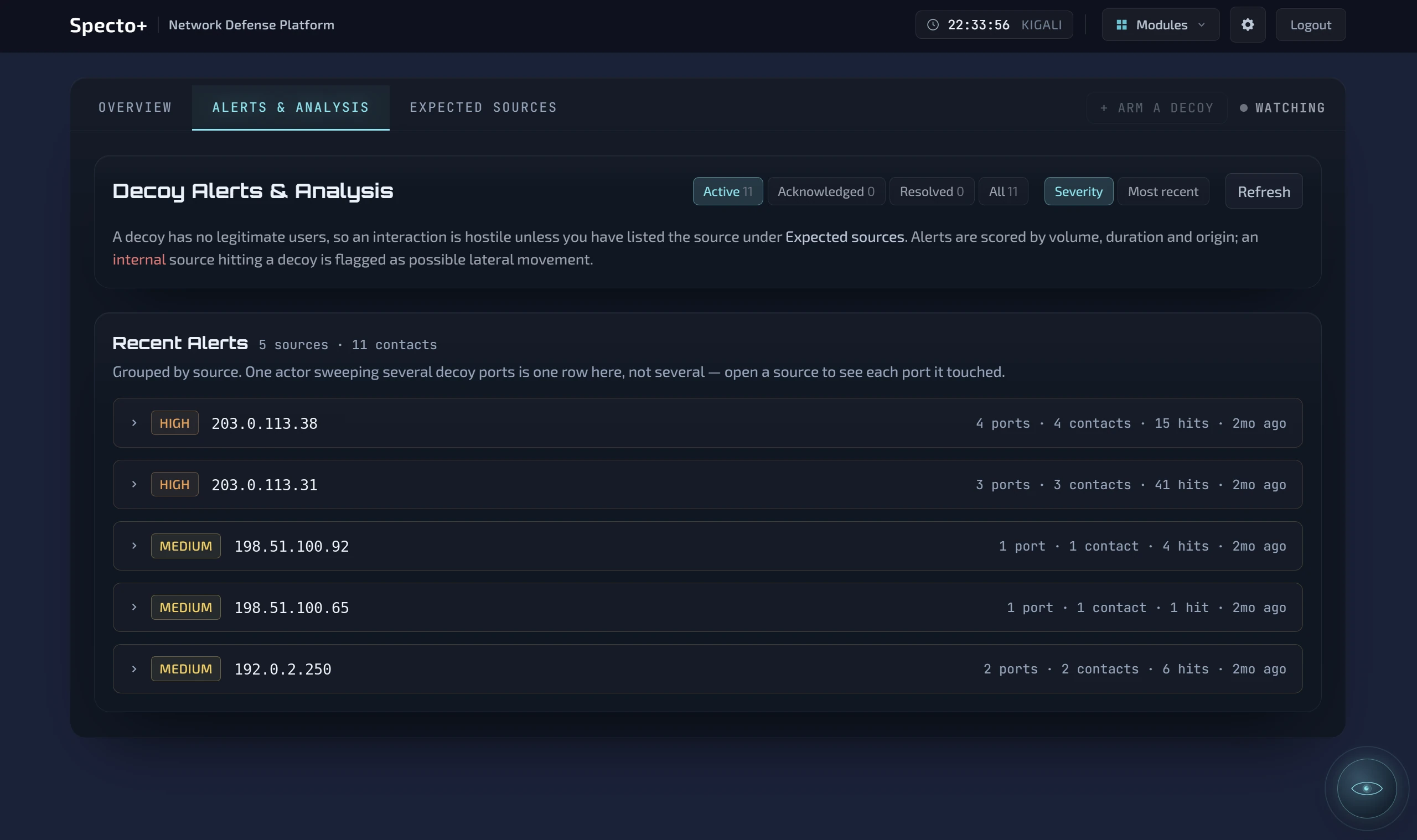
A decoy resembles a real network service but has no normal business users. Specto+ records unexpected interaction so your team can review the source, time and captured packets.
Allowlist legitimate scanners. Decoy contacts appear on the dashboard; they do not send email or phone alerts.
Example: An office device contacts a decoy outside working hours. Your team checks whether it was an approved scanner or activity requiring investigation.

03 / EXTERNAL VIEW

Check what your public services reveal.
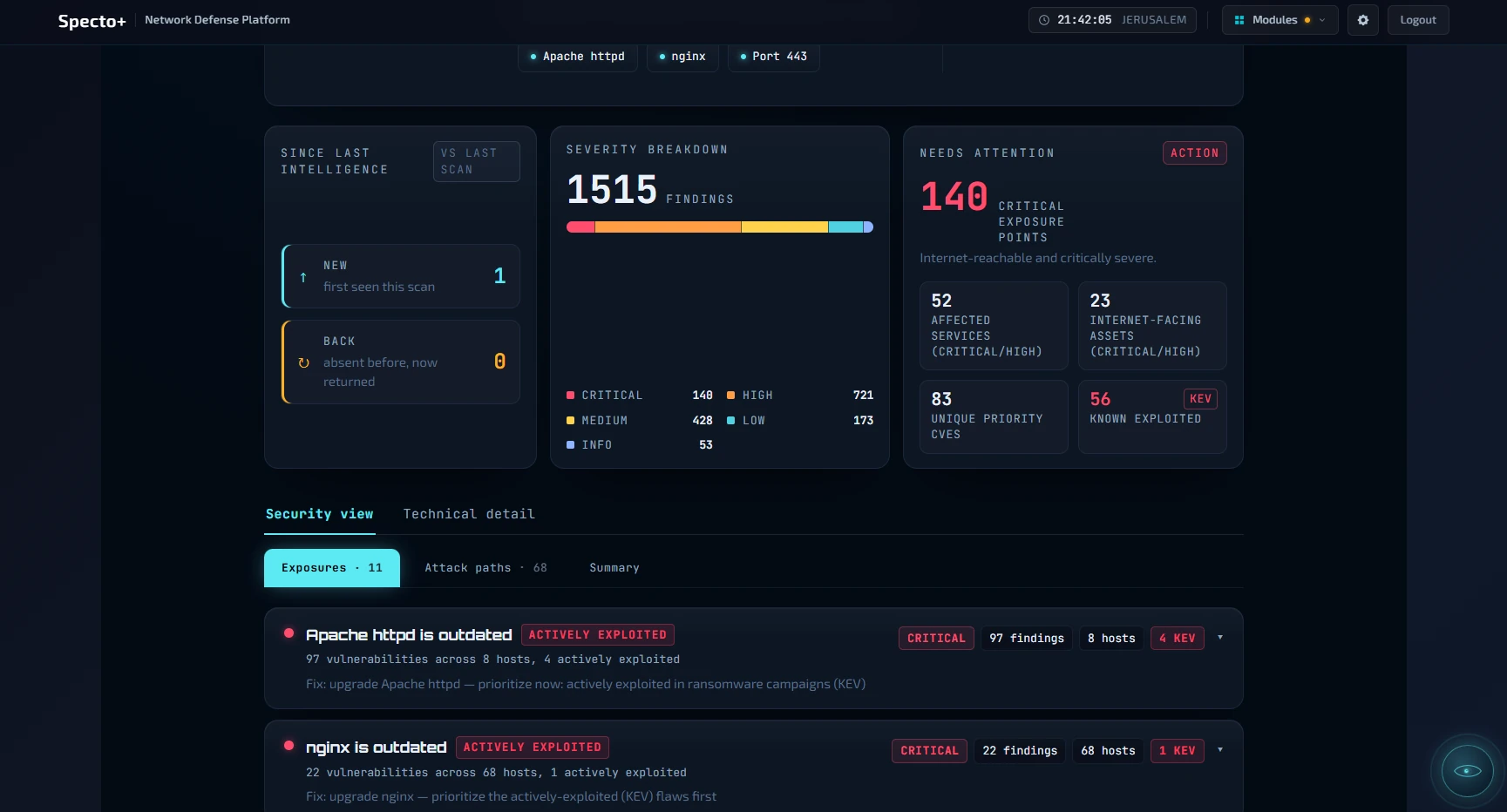
Review public domains and IP addresses for exposed services, mail-security records and publicly reachable files. Prioritise follow-up work using recorded responses.
Checks run from your appliance through your connection. They do not run exploits; login-page checks are optional.
Example: Check whether an old backup or configuration file is reachable on your public website.
Specto+ external view — product screenshot from ThinkCyber

OPTIONAL AI ASSISTANT / CY

Ask questions about your network.

Cy explains network information in plain language. Cloud AI uses your account and key; context goes to that provider. A local model requires a paid licence. Without a model, Cy is off.
External scans reach outside the network. Optional intelligence lookups share public addresses with enabled services.

FREE EDITION

Start with internal visibility.

Internal device discovery and assessment coverage are free, with no device limit or trial clock. Cy can use your own cloud AI key.
The official free-download link is marked coming soon. Enquire with Teqware about availability.

PAID LICENCE

Add exposure checks, decoys and exercises.

A paid licence adds the external view, decoys, exercises, Endpoint Control and support for a local AI model. Licensing is yearly per box, rather than per device.
Enquire about the 30-day trial of paid modules and confirm the scope for your organisation.

BEFORE DEPLOYMENT

What your IT team should prepare.

  • A virtual machine on hardware your organisation owns.
  • A bridged network adapter, not NAT.
  • Permission for extra hardware addresses when using decoys.
  • An optional mirror port for broader traffic visibility.
  • Sizing and connectivity requirements confirmed for your environment.
Exclude sensitive devices from probing; excluded devices remain unassessed. The appliance retrieves public vulnerability feeds. Confirm permitted outbound access.

How to start

1. Share your environment. Tell Teqware about your network, sites and IT priorities.
2. Review deployment fit. Confirm hardware, virtualisation, network access and scan exclusions.
3. Agree on an evaluation. Choose the edition and trial scope, then review findings with your IT team.

Useful terms, explained

Virtual machine: A software-based computer running on your existing server or virtualisation platform.
Decoy: A deliberately unused service that helps reveal unexpected activity.
Packet capture: Recorded network traffic for investigation.
Attack surface: Systems and services someone can discover or reach.

Visibility and skills work together.

Specto+ focuses on your real network. Cyberium Arena provides hands-on cyber security training in a separate cloud-based environment. Explore both for network visibility and workforce development.

Turn findings into a practical fix list

Help a small IT team decide where to start. Specto+ groups version-matched vulnerabilities into a prioritised list and highlights weaknesses on CISA’s known-exploited list. Per-device PDF and CSV reports make findings easier to share with the people responsible for remediation.

A confirmed software-version match is evidence of an affected version, not proof that exploitation will succeed in your environment. Findings that need further verification remain labelled for review.

Practise the response, from IT to management

SOC Drills: role-based incident exercises authored by Cyberium, with scoring to assess team readiness.

Executive Readiness: AI-guided tabletop exercises using your current security posture, followed by a scored report and decision map. This helps managers practise decisions alongside the technical response.

These are paid capabilities. Ask to evaluate them during the 30-day trial, including the AI configuration and data-sharing choices.

Explore the right setup for your Philippine IT team

Use the demo to discuss your actual priorities: unknown devices, exposed services, suspicious activity or incident readiness. For multiple offices or separate networks, ask about an appliance per network and a consolidated view.

Pair Specto+ visibility with Cyberium’s structured cyber security training when your team also needs practice responding to the kinds of incidents it investigates.

Enquire about Specto+

Tell us about your organisation and what you would like to evaluate. Your enquiry goes to Teqware at info@teqwarecorp.com.

    Tell us what you need. Our team will contact you about your enquiry.

    All fields are required.

    Your details will be sent to the Teqware team at info@teqwarecorp.com.